

Introduction
Every time I fly back to the United States, I find myself in the same dilemma at the airport check-in counter. The airline staff asks me for my Green Card number, and I scramble to find it, only to get confused between the multiple numbers on my card."Is it the USCIS number, the Alien Registration Number, or some other code?" I used to wonder. If you're looking up your green card number for a naturalization application, you'll also want to understand the physical presence requirements before filing. If you've experienced this confusion, you're not alone. In this guide, I'll help you navigate through the numbers on your Green Card so you can easily locate your Green Card number the next time you need it.
Understanding the Green Card Layout
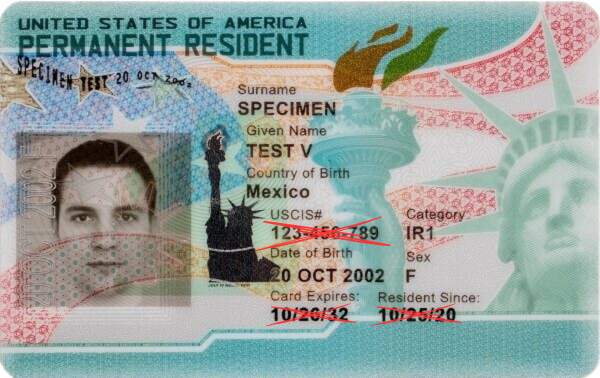
Before we dive in, let's familiarize ourselves with the Green Card's design. The card contains:
• Personal Information: Your name, date of birth, and nationality.
• Photograph: Your picture for identification.
• Unique Identifiers: Such as the Green Card number, USCIS number, and card expiration date.
Step-by-Step Guide to Locating Your Green Card Number
1. Look at the Front of the Card
On the front side of your Green Card, locate the line that says "USCIS#." I stopped counting how many airline staff tried using it as my Green Card Number. This number is your Alien Registration Number (A-Number), not the Green Card number, but it often gets confused for it. You can learn more about A-Number in our earlier blog post.
It is important to understand that the A-Number is used for tracking immigration files and is not necessary for identifying your Green Card number during travel or official processes.
2. Flip to the Back of the Card
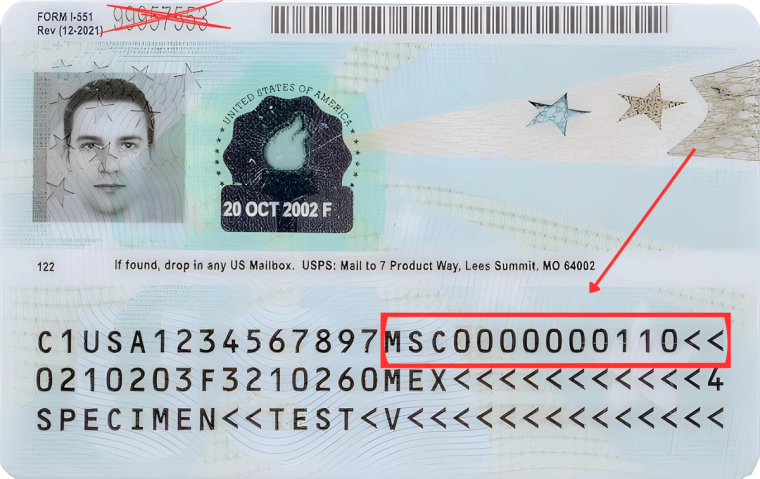
The Green Card number is actually on the back, but it is not where you think it is. The natural reaction would be to take the number printed in the upper left corner of the green card (and yes, it happened to me multiple times that Lufthansa tried to input this number as my green card number)
Here's how to find it:
- Look for a series of letters, digits, and "<" characters. This whole area is what is commonly known as a Machine Readable Zone (or MRZ for short), and this is where USCIS prints the green card number.
- Look at the first line; your Green Card Number is the last 13 characters of that line. It always starts with three letters (for example, MSC), followed by digits and "< "characters.
- Any "< "characters mean a space or empty character.
Understanding the Green Card Number Format
Are you still confused and wondering what those three letters are? Let's break down the format so you can confidently identify your Green Card number without any confusion.
The Long String of Characters
Let's try to decipher the first line of the Machine Readable Zone and understand what the three letters and the digits mean in your Green Card.
Starting with “C1” or “C2”
• C1: Indicates you're a permanent resident living within the United States.
• C2: Signifies you're a commuter permanent resident who lives in Canada or Mexico but works in the U.S.
Following this, you'll see "USA" confirming the United States as your country of permanent residence.
The Alien Registration Number (A-Number)
Next are ten digits representing your Alien Registration Number, also known as the A-Number. This unique number is assigned to you by the U.S. Citizenship and Immigration Services (USCIS) and is crucial for all your immigration records.
Decoding Your Green Card Number
Now, let's focus on the Green Card number itself:
Why It Matters
Your Green Card number is more than an identifier. It ties to your immigration case history. Airlines, employers, and government agencies may require it for verification, so knowing how to locate it quickly can prevent unnecessary delays.
Service Center Codes
The Green Card number starts with three letters that indicate the USCIS service center where your case was processed. Here are the codes and their corresponding centers:
• CSC: California Service Center
• EAC: Eastern Adjudication Center (now the Vermont Service Center)
• IOE: ELIS electronic immigration system (for online filings)
• LIN: Lincoln Service Center (now the Nebraska Service Center)
• MSC: Missouri Service Center (now the National Benefits Center)
• NBC: National Benefits Center
• NSC: Nebraska Service Center
• SRC: Southern Regional Center (now the Texas Service Center)
• TSC: Texas Service Center
• VSC: Vermont Service Center
• WAC: Western Adjudication Center (now the California Service Center)
• YSC: Potomac Service Center
Your Case Details
Following the service center code, there are numerical digits that represent:
• Fiscal Year: Two digits represent the fiscal year your case was opened (note: this might differ from a calendar year as the USCIS fiscal year starts on October 1st).
• Workday of the Year: Three digits represent your case's specific workday in the fiscal calendar that was logged.
• Case Number: The rest of the digits represent a unique number assigned to your case on that day.
Putting It All Together
Let's run through an example. Let's say a Green Card Number is MSC2401234567. Using the glossary from above, we have:
- Service Center Code: (e.g., MSC - Missouri Service Center)
- Fiscal Year: (e.g. 24 - 2024)
- Workday of the Year: (e.g., "012" for the twelfth workday of the Fiscal Year)
- Case Number: (e.g., "34567")
Conclusion
Finding your Green Card Number on your card seems overly complicated because it is not printed on the front page of the card. Nevertheless, now you know it's listed in the first line of MRZ, and it starts with three letters. It can save you some time and stress the next time you check in for your flight.
Ready to take your next step? If you're preparing for citizenship, start with our guides on N-400 physical presence requirements and naturalization costs.